StackShareStackShare
Follow on
StackShare

Discover and share technology stacks from companies around the world.

Follow on

© 2025 StackShare. All rights reserved.

Product

  • Stacks
  • Tools
  • Feed

Company

  • About
  • Contact

Legal

  • Privacy Policy
  • Terms of Service
  1. Stackups
  2. Application & Data
  3. Databases
  4. Databases
  5. MariaDB vs MySQL vs PostgreSQL

MariaDB vs MySQL vs PostgreSQL

OverviewDecisionsComparisonAlternatives

Overview

MySQL
MySQL
Stacks129.6K
Followers108.6K
Votes3.8K
GitHub Stars11.8K
Forks4.1K
PostgreSQL
PostgreSQL
Stacks103.0K
Followers83.9K
Votes3.6K
GitHub Stars19.0K
Forks5.2K
MariaDB
MariaDB
Stacks16.5K
Followers12.8K
Votes468
GitHub Stars6.6K
Forks1.9K

PostgreSQL vs MySQL vs MariaDB - Help me Decide

By Jesus Castello

PostgreSQL & MySQL are the two most popular open-source databases today.

The less popular MariaDB is a MySQL fork that happened after the acquisition of Sun Microsystems by Oracle on January 27, 2010.

Here's a graph representing the popularity of these 3 databases:

DB Ranking

(Source: db-engines.com)

PostgreSQL & MariaDB have been gaining ground recently, while MySQL is slowly declining. But that's not enough to make a decision.

So which one should you choose?

Let's look at this from different angles.

Performance

By running some benchmarks you can get a rough idea of how these databases compare to each other in terms of performance.

For this article, we going to use the HammerDB benchmarking tool.

This tool implements a standardized performance test called TPC-C.

Here's the description:

"TPC-C involves a mix of five concurrent transactions of different types and complexity. The database is comprised of nine types of tables with a wide range of record and population sizes."

Here's the setup:

  • Ubuntu 18.04
  • 1 GB RAM
  • 1 CPU
  • MySQL 5.7.23
  • MariaDB 10.1
  • PostgreSQL 10.5
  • Default settings

We ran the tests for 5 minutes for each database.

Here are the results:

  • PostgreSQL 18534 TPM, 7972 NOPM
  • MySQL 14051 TPM, 4659 NOPM
  • MariaDB 21441 TPM, 7172 NOPM

The meaning of these two values (TMP & NOPM) is described like this:

"TPM values cannot be compared between different database types. The NOPM value is based on a metric captured from within the test schema itself. As such NOPM (New Orders Per Minute) is a performance metric independent of any particular database implementation and is the recommended primary metric to use."

Performance Chart

Like any benchmark the results depend on the specific scenario the tests are run in.

This particular benchmark tries to reproduce the workload of any industry that must manage, sell or distribute a product or service.

Knowing that, we can conclude that both PostgreSQL & MariaDB are faster than MySQL in this particular scenario, with PostgreSQL coming on top of the raw performance game.

Features

These 3 databases support all the basic SQL operations you would expect.

But when it comes to more advanced features there is a lot of variability between them.

For example, PostgreSQL supports materialized views, while MySQL doesn't.

Here's a feature comparison table:

FeaturePostgreSQLMySQLMariaDB
Materialized Views✓✖✖
Partial Indexes✓✖✖
Array Data Type✓✖✖
JSON Data Type✓✓✓
CHECK constraints✓✖✓ (from version 10.2.1)
Replication✓✓✓
Full-Text Search✓✓✓
UPSERT✓✓✓
Common Table Expressions✓✓✓
Sequences✓✖✓

Looking at this table we can conclude that PostgreSQL has the most features implemented.

Besides these features, you can find some behavior differences.

For example, this query:

select 1000/0;

Returns NULL in MySQL, while PostgreSQL & MariaDB (since version 10.2.4) return a division by zero error.

This can be changed with SQL modes in MySQL.

Administration & Monitoring Tools

Because databases are critical software components there are dozens of tools available for administration, monitoring & troubleshooting.

Starting with the command-line applications:

  • mysql (MySQL, MariaDB)
  • psql (PostgreSQL)

These are great for basic administration tasks.

Why?

Because they come built-in with their respective servers so they are always available. There is nothing extra to install.

They both have a command history available, so you can re-run previously executed queries & commands.

And they have a set of bult-in commands that can facilitate interacting with the database.

For example, psql has the \d command to list all your databases, and mysql has the status command to get information like the server version & uptime.

Official graphical tools are also available.

They are:

  • MySQL Workbench (MySQL, MariaDB)
  • pgAdmin4 (PostgreSQL)

Here's a screenshot from pgAdmin4:

![pgAdmin4]https://img.stackshare.io/stackups/postgresql_vs_mysql_mariadb_pgAdmin4.png)

And for MySQL Workbench:

MySQL Workbench

Now we move onto more specialized tools like pghero (PostgreSQL).

PgHero is "a performance dashboard for Postgres".

Here's a screenshot:
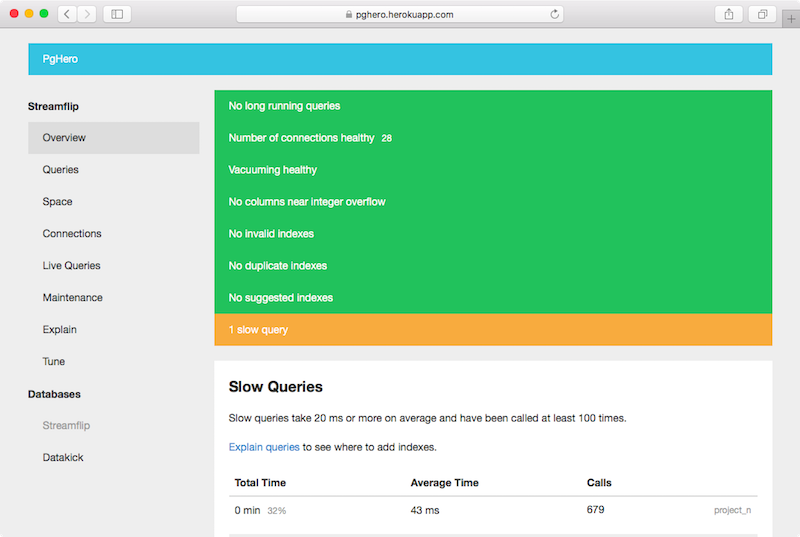
pghero

For MySQL, and MariaDB, you can use MySQL Tuner. This is a Perl script that will analyze your configuration file & database statistics to produce configuration recommendations.

Here's a screenshot:

mysqltuner

There are also log-parsing tools to help you find slow queries.

Here's pt-query-digest for MySQL, a tool for analyzing your logs & running queries to find the slowest queries so you can optimize them.

As you can see in this screen, it's also a command-line tool:

pt-query-digest

And here is pgBadger for PostgreSQL:

pgBadger

pgBadger is like pt-query-digest, but it will analyze PostgreSQL logs & slowest queries.

It looks like PostgreSQL has more graphical tools available, so if you are more comfortable using tools with graphical frontends, instead of command-line applications, then you may want to keep this in mind when making your decision.

Extensibility

You can install plugins & extensions if you need extra features for your database.

Extending MySQL & MariaDB is mostly done in the form of UDFs (User-Defined Functions), which are small plugins written in C.

However, it doesn't seem to be a very popular feature, so it's hard to find any useful UDF extensions.

PostgreSQL has some helpful extensions:

  • PostGIS adds spatial search capabilities for geographic information systems (GIS)
  • HStore allows you to use key-value storage without having to install a specialized database
  • Multicorn allows you to query other sources of data (like Redis, Amazon S3, or even Twitter!) as if they were real tables

If you need any of these extensions then PostgreSQL might be a great choice for you.

Final Considerations

To make a good decision you should consider what your needs are.

  • Is your application going to do a lot of work with geographic information? Then the PostGIS extension would be of great help.
  • Could your application benefit from specific features that each database supports, like materialized views or partial indexes? Then choose that database.
  • Do you need more hosting & support options? Then MySQL or MariaDB may be a better fit.

We hope you found this comparison useful!

MariaDB vs MySQL vs PostgreSQL: What are the differences?

MariaDB, MySQL, and PostgreSQL are all relational database management systems (RDBMS). Here are the key differences between them.

  1. Data Processing Language: MariaDB and MySQL both use Structured Query Language (SQL) as their data processing language. However, PostgreSQL not only supports SQL but also extends it with additional features and capabilities. PostgreSQL offers a more robust and advanced SQL implementation compared to MariaDB and MySQL.

  2. Storage Engines: MariaDB and MySQL originally had the same storage engine, which is known as the InnoDB engine. However, MariaDB introduced its own storage engines, such as Aria, XtraDB, and others, providing additional options for database optimization and performance tuning. PostgreSQL uses the PostgreSQL Object Relational Database Management System (ORDBMS) as its storage engine, which offers advanced features like JSONB, full-text search, and support for geospatial data.

  3. Replication and Clustering: MariaDB and MySQL both offer built-in support for replication, allowing data to be copied and synchronized across multiple database servers. However, MariaDB has further enhanced its replication capabilities and introduced features like parallel replication and multi-source replication. On the other hand, PostgreSQL does not have built-in support for replication and clustering, but it provides various third-party tools and extensions for achieving replication and high availability.

  4. Data Types and Indexing: MariaDB and MySQL have similar data types and indexing capabilities, although MariaDB includes some additional data types like JSON and virtual columns. PostgreSQL, on the other hand, provides a wider range of data types, including arrays, hstore (key-value pairs), and enumerated types. PostgreSQL also has advanced indexing options, such as partial indexes and expression indexes, which allow for more efficient querying and data retrieval.

  5. Concurrency Control: MariaDB and MySQL use a technique called multi-versioning concurrency control (MVCC) for handling concurrent database operations. This allows multiple users to access the database concurrently without locking the entire tables. PostgreSQL also utilizes MVCC but provides more fine-grained control over transactions, offering features like Serializable isolation level and advisory locks to handle complex concurrency scenarios.

  6. Community and Ecosystem: MariaDB and MySQL are both derived from the same codebase and have a similar community of developers and users. They share many libraries, tools, and frameworks. However, MariaDB has been developed as a community-driven open-source project, with a strong focus on being a drop-in replacement for MySQL. PostgreSQL has its own independent community that is known for its dedication to standards compliance, advanced features, and focus on data integrity.

In summary, MariaDB and MySQL share a common origin, with MariaDB aiming for compatibility and additional features, while PostgreSQL stands out for its extensibility, advanced features, and support for complex queries.

Share your Stack

Help developers discover the tools you use. Get visibility for your team's tech choices and contribute to the community's knowledge.

View Docs
CLI (Node.js)
or
Manual

Advice on MySQL, PostgreSQL, MariaDB

George
George

Student

Mar 18, 2020

Needs adviceonPostgreSQLPostgreSQLPythonPythonDjangoDjango

Hello everyone,

Well, I want to build a large-scale project, but I do not know which ORDBMS to choose. The app should handle real-time operations, not chatting, but things like future scheduling or reminders. It should be also really secure, fast and easy to use. And last but not least, should I use them both. I mean PostgreSQL with Python / Django and MongoDB with Node.js? Or would it be better to use PostgreSQL with Node.js?

*The project is going to use React for the front-end and GraphQL is going to be used for the API.

Thank you all. Any answer or advice would be really helpful!

620k views620k
Comments
Ido
Ido

Mar 6, 2020

Decided

My data was inherently hierarchical, but there was not enough content in each level of the hierarchy to justify a relational DB (SQL) with a one-to-many approach. It was also far easier to share data between the frontend (Angular), backend (Node.js) and DB (MongoDB) as they all pass around JSON natively. This allowed me to skip the translation layer from relational to hierarchical. You do need to think about correct indexes in MongoDB, and make sure the objects have finite size. For instance, an object in your DB shouldn't have a property which is an array that grows over time, without limit. In addition, I did use MySQL for other types of data, such as a catalog of products which (a) has a lot of data, (b) flat and not hierarchical, (c) needed very fast queries.

575k views575k
Comments
BrockHerion
BrockHerion

May 6, 2020

Needs adviceonMongoDBMongoDBPostgreSQLPostgreSQL

Hi everybody, I'm developing an application to be used in a gym setting where athletes fill out a health survey, and coaches can analyze the results. However, due to the dynamic nature of some aspects of the app and more static aspects of the other, I am wondering if/how I would integrate MongoDB with my existing PostgreSQL database. I would like to store things like registrations, license information, and club information in Postgres, while I am thinking about moving things like user surveys, logging, and user settings information over to MongoDB. Some fields on the survey are integers, some large blocks of text, and some are arrays. My thought is, if I moved that data to MongoDB, it would give us greater flexibility in terms of adding and removing fields and data to them, and it would scale a lot easier than Postgres. Not to mention it will be easier to organize that kind of data. Is that overkill or am I approaching this issue the right way? Thank you!

691k views691k
Comments

Detailed Comparison

MySQL
MySQL
PostgreSQL
PostgreSQL
MariaDB
MariaDB

The MySQL software delivers a very fast, multi-threaded, multi-user, and robust SQL (Structured Query Language) database server. MySQL Server is intended for mission-critical, heavy-load production systems as well as for embedding into mass-deployed software.

PostgreSQL is an advanced object-relational database management system that supports an extended subset of the SQL standard, including transactions, foreign keys, subqueries, triggers, user-defined types and functions.

Started by core members of the original MySQL team, MariaDB actively works with outside developers to deliver the most featureful, stable, and sanely licensed open SQL server in the industry. MariaDB is designed as a drop-in replacement of MySQL(R) with more features, new storage engines, fewer bugs, and better performance.

--
Replication;Insert Delayed;Events;Dynamic;Columns;Full-text;Search;GIS;Locale;Settings;subqueries;Timezones;Triggers;XML;Functions;Views;SSL;Show Profile
Statistics
GitHub Stars
11.8K
GitHub Stars
19.0K
GitHub Stars
6.6K
GitHub Forks
4.1K
GitHub Forks
5.2K
GitHub Forks
1.9K
Stacks
129.6K
Stacks
103.0K
Stacks
16.5K
Followers
108.6K
Followers
83.9K
Followers
12.8K
Votes
3.8K
Votes
3.6K
Votes
468
Pros & Cons
Pros
  • 800
    Sql
  • 679
    Free
  • 562
    Easy
  • 528
    Widely used
  • 490
    Open source
Cons
  • 16
    Owned by a company with their own agenda
  • 3
    Can't roll back schema changes
Pros
  • 765
    Relational database
  • 511
    High availability
  • 439
    Enterprise class database
  • 383
    Sql
  • 304
    Sql + nosql
Cons
  • 10
    Table/index bloatings
Pros
  • 149
    Drop-in mysql replacement
  • 100
    Great performance
  • 74
    Open source
  • 55
    Free
  • 44
    Easy setup

What are some alternatives to MySQL, PostgreSQL, MariaDB?

MongoDB

MongoDB

MongoDB stores data in JSON-like documents that can vary in structure, offering a dynamic, flexible schema. MongoDB was also designed for high availability and scalability, with built-in replication and auto-sharding.

Microsoft SQL Server

Microsoft SQL Server

Microsoft® SQL Server is a database management and analysis system for e-commerce, line-of-business, and data warehousing solutions.

SQLite

SQLite

SQLite is an embedded SQL database engine. Unlike most other SQL databases, SQLite does not have a separate server process. SQLite reads and writes directly to ordinary disk files. A complete SQL database with multiple tables, indices, triggers, and views, is contained in a single disk file.

Cassandra

Cassandra

Partitioning means that Cassandra can distribute your data across multiple machines in an application-transparent matter. Cassandra will automatically repartition as machines are added and removed from the cluster. Row store means that like relational databases, Cassandra organizes data by rows and columns. The Cassandra Query Language (CQL) is a close relative of SQL.

Memcached

Memcached

Memcached is an in-memory key-value store for small chunks of arbitrary data (strings, objects) from results of database calls, API calls, or page rendering.

RethinkDB

RethinkDB

RethinkDB is built to store JSON documents, and scale to multiple machines with very little effort. It has a pleasant query language that supports really useful queries like table joins and group by, and is easy to setup and learn.

ArangoDB

ArangoDB

A distributed free and open-source database with a flexible data model for documents, graphs, and key-values. Build high performance applications using a convenient SQL-like query language or JavaScript extensions.

InfluxDB

InfluxDB

InfluxDB is a scalable datastore for metrics, events, and real-time analytics. It has a built-in HTTP API so you don't have to write any server side code to get up and running. InfluxDB is designed to be scalable, simple to install and manage, and fast to get data in and out.

CouchDB

CouchDB

Apache CouchDB is a database that uses JSON for documents, JavaScript for MapReduce indexes, and regular HTTP for its API. CouchDB is a database that completely embraces the web. Store your data with JSON documents. Access your documents and query your indexes with your web browser, via HTTP. Index, combine, and transform your documents with JavaScript.

Oracle

Oracle

Oracle Database is an RDBMS. An RDBMS that implements object-oriented features such as user-defined types, inheritance, and polymorphism is called an object-relational database management system (ORDBMS). Oracle Database has extended the relational model to an object-relational model, making it possible to store complex business models in a relational database.

Related Comparisons

Bootstrap
Materialize

Bootstrap vs Materialize

Laravel
Django

Django vs Laravel vs Node.js

Bootstrap
Foundation

Bootstrap vs Foundation vs Material UI

Node.js
Spring Boot

Node.js vs Spring-Boot

Liquibase
Flyway

Flyway vs Liquibase